Guide
How to Configure an AI Sales Agent 2026 Guide
Most founder's GTM motion has multiple tools, manual processes, and an old-school CRM that sucks up hours a week to keep on track. For solopreneurs, agency owners, and B2B SaaS companies, the founder does the sales in the early stage, and new opportunities must fill the calendar for the company to succeed.
Unlike LLMs like Claude or ChatGPT that require great prompting, manual integrations, and skills, Grok Bots require goals, job descriptions, skills, routines, and tools that you can set up as easily as logging into your email.
The guide below will help any business owner set up an AI sales agent using Grok Bot.
01
Agent vs LLM
A chat tab answers and forgets and requires you. A sales agent has a goal, standing routines in its profile, logins on a shared computer, and plugins pointed at real systems.
It can research, write CRM records, draft sequences, suggest reply triage, and prepare booking links while you are offline. It still waits when the rule says wait.
The difference shows up in the handoff. A prompt dumps text into your clipboard. A sales agent moves a prospect through a path: signal, research, CRM, draft, send, book meeting, log. If any step is missing, you do not have an employee. You have an AI toy with a sales costume.
02
What does the AI sales agent own?
Write a one-page job card before you connect a single tool. Paste it into the agent profile so standing rules live where the agent always sees them.
Job card
SDR / Sales operator
- Job title
- SDR / Sales operator (or a name you choose)
- Path
- signal → research → CRM → draft → send → book meeting → log
- Owns
- Prospect and enrich (Clay preferred; any enrich tool until Clay is connected)
- Write and clean CRM records in Breakcold (or your CRM of record)
- Load and run Smartlead cold campaigns after you approve
- Draft intent one-to-ones in Gmail and hold until you pick who sends
- Suggest reply triage; escalate judgment calls
- Prepare booking links (Cal.com or your scheduler) after interest
- Log outcomes the same day and keep pipeline hygiene
- Does not own
- Pick a narrow job. Leave newsletter, PR/media pitches, GEO/AI visibility delivery, and site/web shipping to other agents if you run a wider Grok Bot workforce. Your sales agent should not also write the company newsletter or ship homepage copy.
- Approval line
- You approve sends. The agent drafts and waits when the rule says wait.
- Conflicts
- CRM wins conflicts. If Smartlead, Gmail, and Breakcold disagree, Breakcold (or your named system of record) is truth.
On my side I run the same pattern: one sales agent, one job card, founder gate on first send and caps. The transferable piece is the card, not the brand names.
03
The 2 approaches to cold prospecting
Run two lanes on purpose and measure them apart. Mixing them into one queue hides which motion is earning meetings.
Lane 01
Volume cold engine (Smartlead mailer)
- Goal
- About 100 unique first touches on a weekday you can actually review. Raise or cut that number only after you have watched a clean draft week.
- Channel
- Smartlead (or your cold sequencer) after warmup. This is the Basho volume factory, not the CRM.
- Quality gate
- Every keep must clear your KEEP / THIN / SKIP research bar before it can leave.
- From persona
- Your real name (or the founder brand you already own). Do not invent a fake SDR identity on the From line.
- Metric to watch
- Replies and meetings worth taking, not open rate alone.
Lane 02
Intent 1:1 lane
- Triggers
- Funding, marketing-hire, rebrand, or whatever signal matches your ICP this quarter.
- Channel
- Gmail one-to-ones (or LinkedIn / WhatsApp when those connectors are live), not the cold factory.
- Follow-ups
- Day-2 and Day-5 live on this queue.
- Gate
- KEEP drafts stay on HOLD until you pick who sends.
- Metric to watch
- Positive replies and booked calls from a smaller queue.
Keep prospecting rules written on the job card: geography, language, industries, and who to skip (for example, direct competitors). Wide is fine when the KEEP bar is real.
04
How Basho emails work
Basho is the access method for short, research-led cold notes. Jeff Hoffman popularized the approach; the name points at the poet Matsuo Bashō (say more with less), not at a letter acronym. Use the anatomy below. Do not invent expansions for the letters.
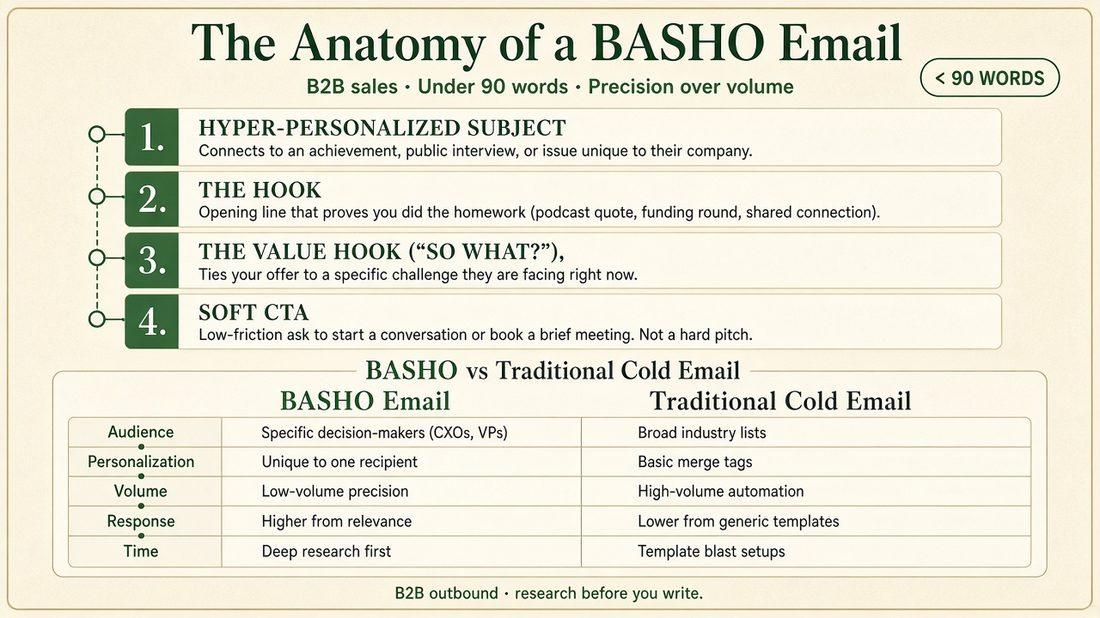
The anatomy (under 90 words, precision over volume)
How Basho differs from a traditional cold blast
The volume lane can still hit ~100 first touches a day. Each note still has to pass the Basho test: could this exact email credibly go to anyone else? If yes, rewrite it.
Hard rules when you (or the agent) write Basho
- Research before you write. One current trigger, one role-specific issue, one clear ask.
- Lead with their world. Your company bio waits.
- One purpose per message. Prefer “Worth comparing notes?” over a preemptive Cal link.
- No fake familiarity, inflated praise, checking-in bumps, or urgency theater.
- Hold for founder approval before send, same as every other external draft.
- Cold access stays Basho. Save Challenger-style discovery for live meetings so the voice does not blur.
Paste this into Grok Bot as a skill (or into Talk when you need a one-off rewrite)
Name: Basho email - anatomy + under 90 words

Purpose: Turn a KEEP prospect into a Basho access email (or reply draft) that follows the four-part anatomy and stays under 90 words.

Body:
You write Basho access emails only. Basho means short, one-to-one, research-led. Named after the poet's "say more with less," not a letter acronym.

Anatomy (in order):
1) Hyper-personalized subject: achievement, public interview, or issue unique to their company.
2) The hook: first line proves homework (podcast quote, funding round, shared connection, public post).
3) The value hook ("so what?"): tie our offer to one challenge they face right now.
4) Soft CTA: one low-friction ask to start a conversation. No hard pitch. No Cal / booking link on first cold touch unless the founder explicitly overrides.

Constraints:
- Under 90 words in the body.
- One company, one person, one current trigger, one ask.
- Never invent titles, funding, quotes, or personal details. If the source is thin, say so and stop.
- Central test: if this exact email could go to anyone else, rewrite it.
- Tone: plain, coworker, founder voice from Brand DNA. No gimmicks, no "just checking in," no fake scarcity.
- Output: subject + body + one-line next step if they reply yes. Mark HOLD for founder approval before send.
How a human writes with the same framework
- Find one verifiable trigger (post, hire, raise, interview, launch).
- Write the subject from that trigger, not from your product name.
- Open with the hook in one sentence.
- Add one “so what?” sentence that connects their situation to your offer.
- Close with one soft ask. Count words. Cut until you are under 90.
- Run the “anyone else?” test. Then send only after you approve.
05
Which skills do you install?
Skills in Grok Bot should be installable recipes you can paste, not private IDs from someone else’s account. Create each skill with a clear name, a one-line purpose, and a full body. Point the agent profile at them so Talk can call them by name.
The Basho skill above is skill 0 for access copy. Install these five next.
1. Access notes - trigger + one ask
Name: Access notes - trigger + one ask

Purpose: Turns a KEEP prospect into a short access note (email or reply draft) with one clear ask, using Basho anatomy.

Body:
When asked for an access note, follow Basho (see skill "Basho email - anatomy + under 90 words").

Steps:
1) Confirm KEEP status and the verified trigger. If research is THIN or SKIP, do not draft a sendable note.
2) Subject: hyper-personalized to the trigger or company-specific issue.
3) Body order: hook → value hook ("so what?") → soft CTA.
4) One ask only (reply with timing, or accept a booking link after interest). No pitch-deck dump. No fake familiarity.
5) Hard limit: under 90 words for cold first touches. Shorter is fine.
6) Channel: volume drafts go toward Smartlead after founder approval; intent drafts stay in Gmail on HOLD until the founder picks who sends.
7) Output: subject (if email) + body + suggested next step if they reply yes + HOLD flag.
2. Research bar - KEEP / THIN / SKIP
Name: Research bar - KEEP / THIN / SKIP

Purpose: Scores a prospect before any draft or CRM write that could become a send.

Body:
Score every prospect before drafting or writing CRM fields that imply a send path.

KEEP:
- Clear ICP fit
- Reachable contact
- Real trigger or strong fit reason
- Offer match in one sentence of evidence

THIN:
- Maybe fit, but missing trigger, weak contact, or unclear offer match
- Enrich once; do not send yet

SKIP:
- Out of ICP, direct competitor, no reachable path, or research that would require inventing facts

Rules:
- Never invent titles, funding, quotes, or personal details.
- If the source is thin, mark THIN or SKIP.
- For volume research bars that use a public AI answer check (for example, who shows for a buyer query), list only names you actually saw. Do not invent who_shows.

Output:
- Label: KEEP | THIN | SKIP
- Three bullets of evidence
- Recommended next action (draft Basho / enrich once / pause / skip)
3. Intent follow-up - Day 2 and Day 5
Name: Intent follow-up - Day 2 and Day 5

Purpose: Keeps the intent lane alive after first touch without nagging.

Body:
Only for intent KEEP contacts already logged in CRM (Breakcold or named system of record). Volume Smartlead sequences use their own cadence; do not double-send.

Day 2:
- New angle or one fresh public detail
- Still one ask
- Reference the first note lightly
- Stay under Basho length when possible

Day 5:
- Final polite bump or close-the-loop
- Offer an easy out
- Stop after Day 5 unless they reply

Rules:
- Hold for founder approval before send, same as first touch.
- No "just checking in" with zero new information.
- If they opt out or say not interested, stop and log CRM the same day.

Output: draft subject + body + day label (2 or 5) + HOLD flag.
4. Humanizer - before external copy
Name: Humanizer - before external copy

Purpose: Rewrites drafts so they sound like the founder before anything leaves the agent.

Body:
Before any external copy (email, LinkedIn, WhatsApp, sequence step), rewrite against Brand DNA voice and these bans:

Remove:
- Em dashes and en dashes used as drama
- Negative parallelisms ("It's not X, it's Y")
- Parallel repetition stacks and rule-of-three punch lists
- Empty hype and AI vocabulary (delve, crucial, tapestry, pivotal, and similar)
- Fake familiarity and stacked short punchlines

Keep:
- Facts and the one ask
- Founder voice from Brand DNA
- Basho anatomy when the draft is an access note

Output: revised draft + a short list of what changed. Still HOLD for founder approval before send.
5. CRM diligence - same-day log
Name: CRM diligence - same-day log

Purpose: Forces Breakcold (or your CRM of record) to stay honest the day something meaningful happens.

Body:
Same-day log required for:
- Meaningful replies
- Books / meetings set
- Stage changes
- Unsubscribes
- Bounces that end the path

Required fields on the note or activity:
- Who
- Channel (Smartlead / Gmail / LinkedIn / WhatsApp / other)
- What happened
- Next step
- Owner

Rules:
- CRM wins conflicts with sequencers and inboxes.
- Positive replies move out of the sequencer into CRM the same day.
- Do not leave "sent" as the last note when a human reply already exists.
- Finished no-replies and hard bounces get scrubbed from sequencer storage without becoming fake CRM deals.

Output: confirmation of what was logged, where, and any conflict that needs the founder.
Optional later: a discovery skill for live meetings (Challenger). Keep cold access on Basho so the methods stay separate.
06
Which routines do you schedule?
Routines are jobs on a clock, written as outcomes. Schedule them after you have watched a clean draft week. Adjust times to your timezone (examples below use America/Cancun weekday mornings).
Paste each block when you create a Grok Bot routine (name + schedule hint + full prompt).
1. Weekday volume factory
Name: Weekday volume factory (Basho / Smartlead)
Schedule hint: weekdays 08:00 America/Cancun (or your send-prep hour)

Prompt:
Run the volume cold lane for today.

Goal: prepare toward ~100 unique first touches for the weekday Smartlead mailer (or the founder's capped number). Missing the agreed daily first-touch target is a miss; report it plainly.

Steps:
1) Research the next ICP slice.
2) Enforce Research bar - KEEP / THIN / SKIP. Never invent facts.
3) For KEEP (and approved THIN unlock rules if the founder set any), prepare Basho-compliant copy via Access notes / Basho skill. Under 90 words. Soft CTA. No Cal link on cold first touch.
4) Load or unlock only what the founder already approved for cold send volume. Do not raise caps. Do not start a new campaign blast without approval.
5) From persona stays the founder's real name.
6) Report: KEEP/THIN/SKIP counts, sendable pool vs daily target, blockers, anything waiting on the founder.
2. Weekday intent signal sweep
Name: Weekday intent signal sweep
Schedule hint: weekdays mid-morning America/Cancun

Prompt:
Run the intent 1:1 lane for today.

Triggers to sweep: funding, marketing-hire, rebrand (or the founder's current ICP signals).

Steps:
1) Find today's signals that match ICP.
2) Score KEEP / THIN / SKIP. Enrich once if THIN.
3) For KEEP: draft Gmail one-to-ones with Basho anatomy. Log Breakcold (or CRM of record).
4) HOLD every KEEP wave until the founder picks who sends. Do not place intent on the Smartlead cold factory.
5) Queue Day-2 / Day-5 follow-ups only for intent KEEP already logged.
6) Report: KEEP drafts on HOLD, THIN needing enrich, SKIP reasons, anything hot.
3. Reply watch
Name: Reply watch
Schedule hint: several times on weekdays, or after major send windows

Prompt:
Watch new replies across Smartlead, Gmail, and any live LinkedIn / WhatsApp sessions.

Steps:
1) Draft triage for each new reply (positive / neutral / not now / unsubscribe / bounce).
2) Simple lock-a-time can move with standing rules (prepare Cal.com link after clear interest).
3) Judgment calls, pricing fights, angry threads, and anything that can burn trust wait for the founder.
4) Log meaningful replies in CRM the same day. Move positives out of the sequencer storage path.
5) Report: drafts ready, items waiting on founder, CRM updates made.
4. Pipeline hygiene
Name: Pipeline hygiene
Schedule hint: weekday afternoon or end of day

Prompt:
Keep CRM as system of record.

Steps:
1) Reconcile Smartlead / Gmail / CRM conflicts; CRM wins.
2) Scrub finished no-replies and hard bounces out of sequencer storage without turning them into fake CRM deals.
3) Flag stage drift, duplicate people, and missing next steps.
4) Do not invent pipeline value.
5) Report what you cleaned and what still needs a founder decision.
5. End-of-day log
Name: End-of-day log
Schedule hint: end of founder workday, America/Cancun

Prompt:
Before close, confirm every meaningful motion today is in CRM.

Include: first touches vs daily target, intent KEEP on HOLD, replies, books, unsubscribes, bounces that end a path, and anything still waiting on founder approval.

If something meaningful happened and is not logged, log it now. Then send a short end-of-day note to the founder.
Be honest about friction. LinkedIn or WhatsApp reply watch may be blocked until browser sessions are stable. Let email lanes carry the core motion until those connectors are reliable.
07
AI Sales Agent Tools
Give every tool one job so the agent cannot hide truth in the wrong app. Connect only what you will actually use this month.
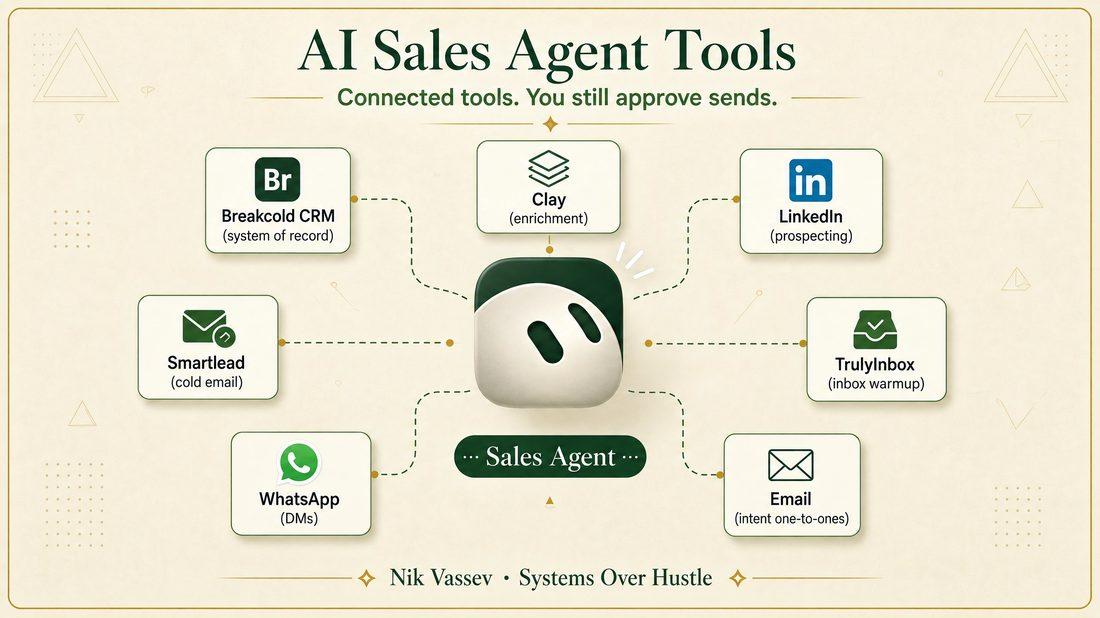
What it is. AI-native sales CRM for people and agents (contacts, pipelines, tags, multichannel inbox).
Why you get it. One system of record so Smartlead, Gmail, and chat threads cannot disagree forever.
How you use it. Import only after KEEP / THIN / SKIP; same-day notes on replies, books, stage changes; CRM wins conflicts.
What it is. Cold email sequencing and mailbox infrastructure for outbound.
Why you get it. The volume mailer that can sustain weekday first touches (on my stack, about 100 unique first touches when the factory is healthy).
How you use it. Load Basho-ready KEEP after approval; warmup and send caps stay founder-gated; positive replies move into Breakcold the same day. Smartlead is not the CRM.
What it is. Email warmup and inbox-placement infrastructure.
Why you get it. Domains and mailboxes need reputation before you scale cold volume.
How you use it. Keep warmup separate from campaign copy decisions; the agent reports health, you still own domain and mailbox changes.
What it is. Your real inbox for founder-thread and intent work. Google Workspace if that is your stack.
Why you get it. Intent 1:1 notes should not ride the cold factory.
How you use it. Draft KEEP intent notes, Day-2 / Day-5 follow-ups, and HOLD until you pick who sends.
What it is. List building, enrichment, and research workflows across many data sources.
Why you get it. Cleaner ICP rows before CRM and before send paths.
How you use it. Search and enrich toward Breakcold and the right lane; until Clay is connected, use your interim enrich path and still enforce KEEP / THIN / SKIP.
What it is. Professional network for signal research and light outreach.
Why you get it. Hires, posts, and role changes show up here before they hit a database.
How you use it. Research triggers; optional light outreach when the Grok Bot computer session is signed in and stable. Same approval rules as email.
What it is. Messaging for high-trust or warm follow-up when that channel fits your ICP.
Why you get it. Some buyers reply faster here than in email.
How you use it. Only when the session is live; same founder gate; log CRM the same day.
What it is. Open scheduling links for meetings.
Why you get it. Booking should be boring after interest.
How you use it. Default your preferred length (I use a 30-minute link) in replies after interest. Do not paste the booking link into cold first touches.
What it is. The shared desktop that comes with the agent.
Why you get it. Browser logins for Clay, LinkedIn, ChatGPT research checks, and anything without a clean plugin.
How you use it. You take over once, sign in, and leave the session. Passwords never go in chat. Product home: the Grok Bot workforce guide.
08
How do you set this up on Grok Bot?
If you need the full roster and plan choices, use the wider Grok Bot workforce guide. For this sales agent alone, setup is short.
01
Create the agent
Name it. Title it SDR or Sales. Paste standing rules into the profile description: never auto-send cold email without your approval; CRM wins on conflicts; ask before first blast and before send-cap changes; intent KEEP waves HOLD until you pick; do not own newsletter, PR, GEO, or the site.
02
Connect the plugins you trust for this job
Breakcold, Smartlead, Gmail, Calendar. Add TrulyInbox, Clay, LinkedIn, or WhatsApp when ready. Finish every Connect card yourself.
03
Point it at Brand DNA
Point it at Brand DNA and offer docs in Drive (or your files). Tell it to open the files. Do not summarize the company into a vague paragraph and hope.
04
Take the computer
Sign into tools that need a browser session. Confirm Cal.com links work.
05
Install the skills
Install the Basho skill plus the five skills above (Access notes, Research bar, Intent follow-up, Humanizer, CRM diligence). Paste the full bodies. Name them in the first Talk message so the agent knows what to call.
06
Give one concrete first job in Talk
Paste something like: “Sweep today’s marketing-hire signals. Draft KEEP notes in Gmail with Basho. Log Breakcold. Do not send.” Or: “Research the next 20 ICP accounts for the volume lane. Label KEEP / THIN / SKIP. Draft nothing until I approve the KEEP list.”
07
Add routines after a clean draft week
Paste the full routine prompts above; then tune the daily first-touch target (100 is a fine starting bar if you will actually review it).
08
Keep memory about sales
This agent’s job card stays narrow. Soft-link the wider workforce guide for Chief of Staff and other agents.
Profile description = standing rules. Talk = today’s task. Computer = logins. Mix those three up and the agent starts improvising.
09
What does the founder still approve?
You stay on judgment that can burn trust or domains.
- First blast on any new campaign or sequence
- Daily or weekly send-cap changes
- Intent KEEP waves before they leave Gmail (or LinkedIn / WhatsApp)
- Hot replies that need a human read
- Any exception to “CRM is source of truth”
- Anything that spends money or changes domains / mailboxes
Drafting is cheap. Sending is a decision. A queue of KEEP drafts on HOLD means the agent is waiting on your gate, which is correct.
10
What you walk away with
An AI sales agent is useful when it owns a narrow path and you still own the gate. Be strategic with how you approach outbound sales and be ready with a strong pitch when your calendar fills up.
Relative to hiring a human SDR, this stack cost is nearly free: Grok Bot plus a lean tool set versus salary, ramp, and management overhead.
You still pay with attention on first sends and caps. That attention is the point and the personalization is the key to stand out from the noise.
If you want pipeline from outbound, this is the setup.
If you want the brief this agent should read, run the company through Guide IQ and drop the DNA in Drive before you create the second bot. If you want the weekly version of how I run this, that is Systems Over Hustle.