Guide
How to build your AI Agent workforce
Grok Bot lets you hire named AI teammates. Each one has a job, a memory, and access to your real systems. You talk to them the way you talk to an employee. They keep working after you close the laptop.
That is different from chatting with Claude or ChatGPT in a tab. An LLM answers a prompt. An agent has a role, opens email, Drive, calendar, and your CRM, and can run routines while you are offline. Grok 4.6 holds up on quality and cost next to the models founders already know, and it does not watermark your content.
I run this stack every day. An SDR agent found $250K in pipeline in two weeks. An executive assistant owns calendar, mail, meetings, and follow-ups. A developer bot ships sites and apps against GitHub and Vercel from a spoken brief. Those are proof of what becomes possible once setup is done.
Every founder should start with three seats that pay for themselves: an EA for time, an SDR for revenue, and a Dev bot for shipping. Then add more jobs from the menu later in this guide.
This guide is the order that works. First you understand what an agent is. Then you set one up with real context and real access. Only after that do you talk, assign work, and expand the roster. Talking without setup is just another chat window.
01
Who should use this
You are building a real company. You want systems and some of your time back. Another clever prompt will not clear the inbox, the calendar, the site, or the pipeline.
Start with three seats that pay for themselves: an EA for time, an SDR for revenue, and a Dev bot for shipping. Add Content or a specialist when the same work keeps stacking and you want a clean job for it. The roster later in this guide is a menu, not a day-one checklist.
02
What is a Grok Bot agent
Grok Bot is an AI teammate. It has a name, a title, a description, a memory, and a conversation that stays open. Name it something you will actually say. Title is the job. Description is the standing rules and the approval boundary.
This is the teammate view. Desktop and phone. Named jobs, a live chat, routines.
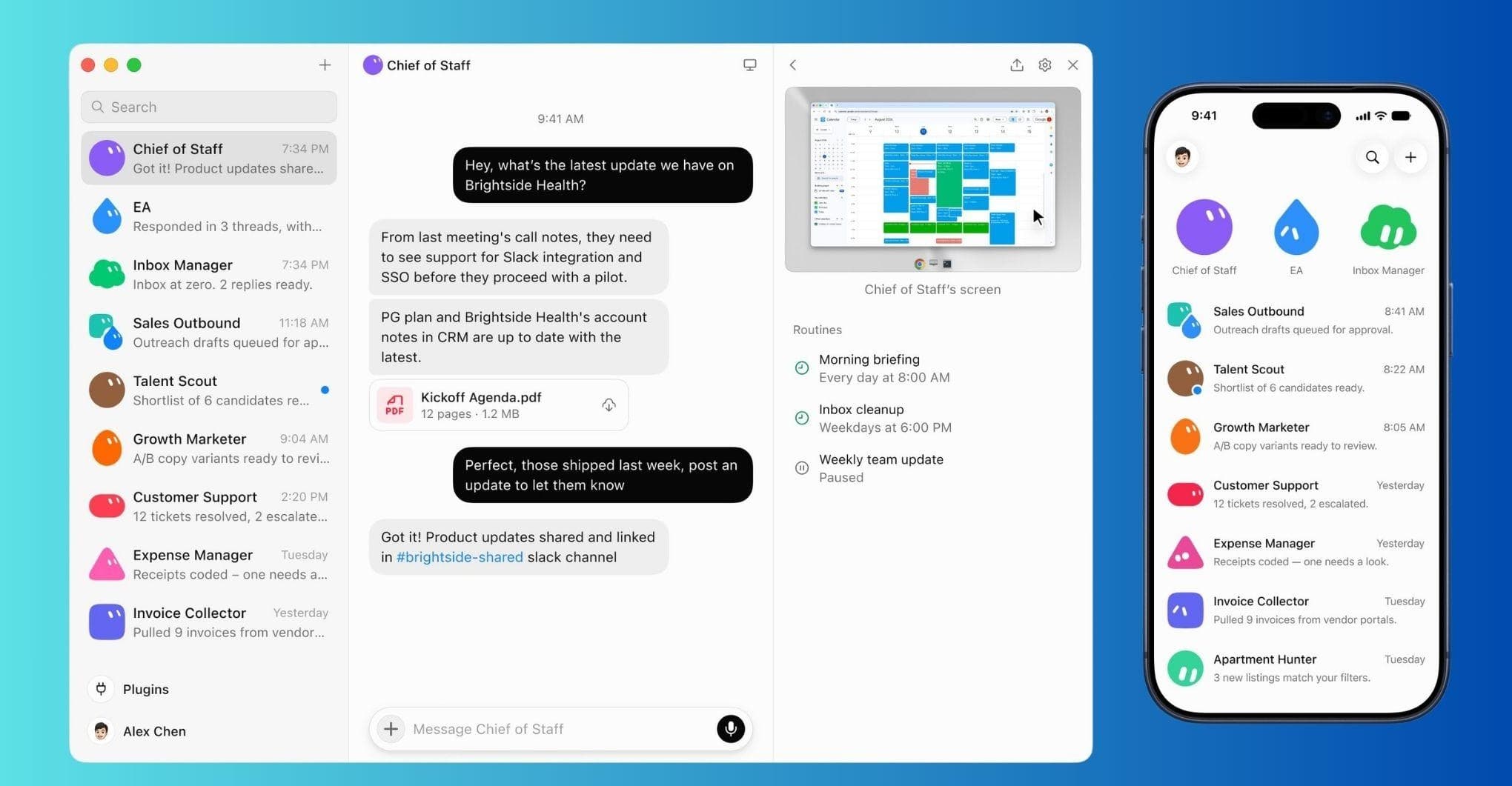
Plugins sit on your Cursor account so every agent can use them. Sites with no plugin run in a browser on a cloud computer. You take that computer over and sign in. It never sees your password and can use most software tools the way an employee would.
A General Helper has no job, so it keeps no useful memory. Never start with one General Helper. Cursor caps an account at 50 bots and group chats. You will hit a foggy helper long before 50.
03
How is an agent different from an LLM
An LLM answers a prompt. An agent has a job. That is the whole split.
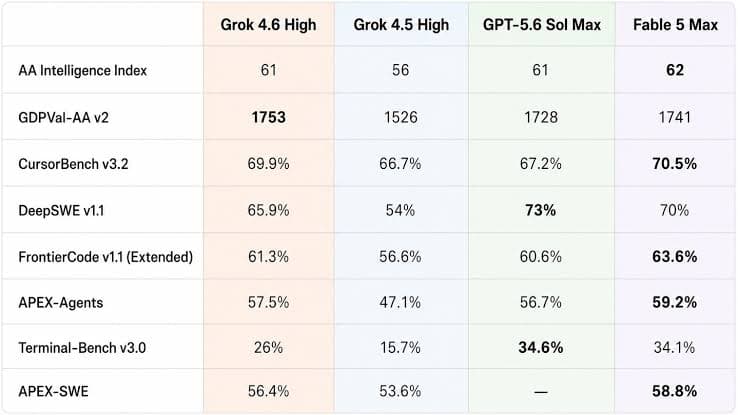
Look at Grok next to GPT and Fable. The model holds. It also routes to Claude for certain tasks.
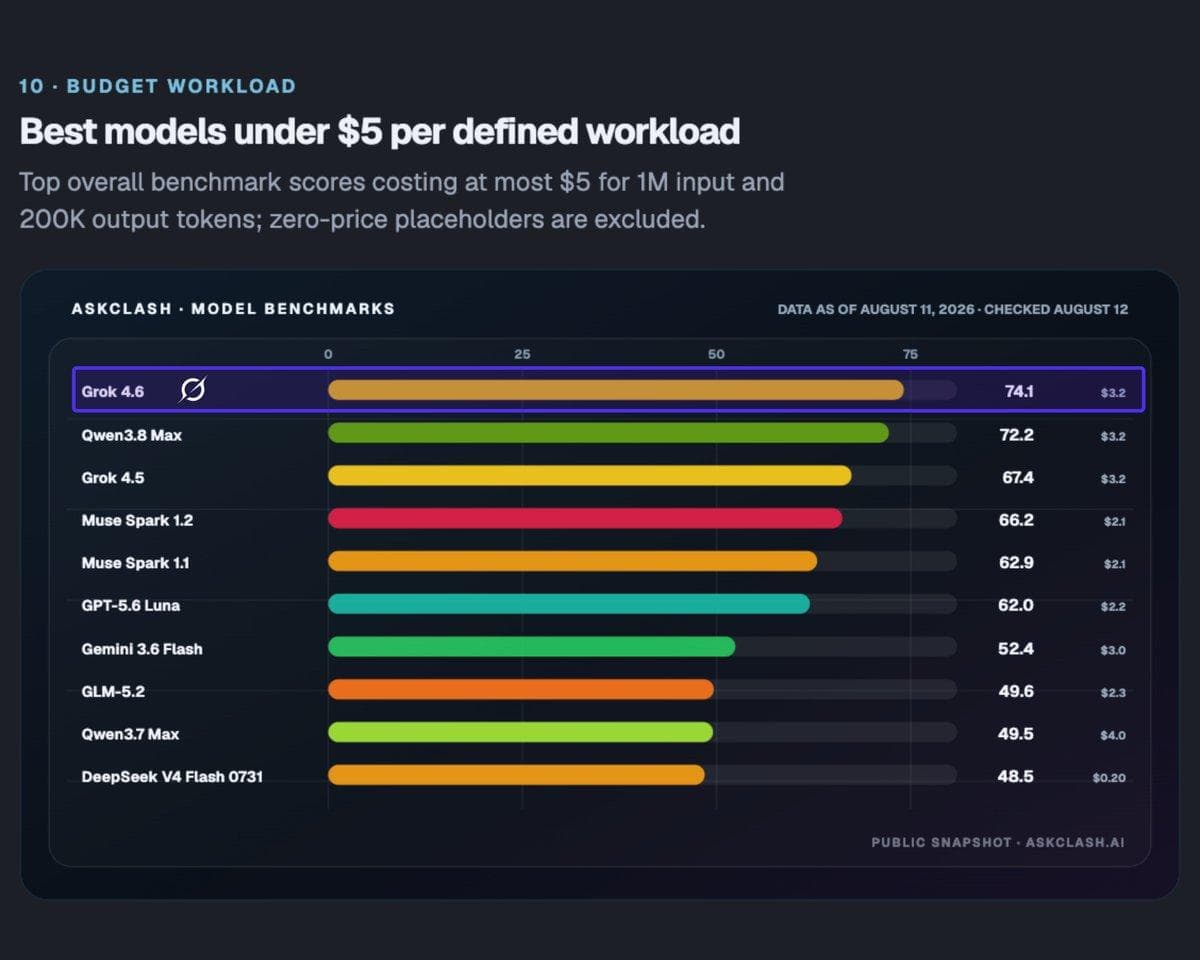
Then look at the cost. Grok 4.6 ranked first among models tested under a $5 workload budget. Intelligence per dollar is getting ridiculously high.
04
What do you get from an agent
05
How do you set this up
Setup before talk. First you give the bot a job, context, and access. Only then do you assign work.
01
Buy the seat on the web
Open cursor.com/dashboard/billing in a browser and pick a paid Cursor plan. Grok Bot is included on Pro, Pro+, Ultra, and Teams. Higher plans hold a bigger weekly usage bucket.
Buy it on the web so the seat sits on your Cursor account. That is the account you will sign into Grok Bot with.
02
Sign in to Grok Bot
Sign in with the same Cursor account that owns the plan. Named jobs, a live chat, routines. Desktop and phone.
03
Create your first agent
Open Bot actions, then Edit Profile. Name it something you will say out loud. Title is the job. Description is the standing rules and the approval boundary.
A General Helper has no job, so it keeps no useful memory. Never start with one General Helper. Cursor caps an account at 50 bots and group chats. You will hit a foggy helper long before 50.
04
Dump your context in
The first dump is the briefing you would give a hire. If you already wrote that briefing in Claude or ChatGPT, bring it over. Add the docs that show what good looks like.
Then point the bot at Brand DNA in Drive and tell it to open the file. Do not summarize DNA into the description and hope. The full dump lives later in this guide, under what you feed them.
05
Connect email, calendar, Drive, CRM
Connect plugins from the sidebar Plugins list, or the in-chat Connect card. Authorize in the browser. If it says Waiting for authorization, hit Reopen. Disabled by team admin is a Teams policy.
Give this first bot only what the first job needs: work email, calendar, and Drive. Leave personal mail alone. The Chief of Staff cannot brief a week it cannot see. If the morning brief invents a meeting, fix the calendar plugin before you add anyone else.
You upload the CRM. The bot reads and drafts against live records. Do not let the bot reformat a giant spreadsheet. A 4,500-row import can burn a weekly bucket and still ship a broken file.
Least privilege is the rule. A content bot does not need the ads account. An influencer bot does not need the personal inbox.
Never paste an API key into chat. Cursor has a secret store.
For sites with no plugin, take over the Grok Bot computer. You sign in. It never sees the password. You type the 2FA. The session stays. One login can serve more than one bot because they share the computer.
If the job is code, the bot stays the coordinator. The Cloud Agent rule is later in this guide.
06
One concrete first job, then Talk
First message is one concrete job. Read tomorrow's calendar. Write a brief. Do not email anyone.
Then hit Talk and speak the next one. Set a meeting with these three people. Ask them for times. Use my booking link. Typing at one model is the old loop.
Setup before talk. Talking without the role, the file, and the access is just another chat window.
07
Add the next bot when ready
Add the next bot only when the same job keeps landing on the Chief of Staff and the context is getting muddy. Name it so it feels personal. If a workflow hits you over and over, it can be a job: invoices, books, bug tickets, repeat build work.
Sidebar Sections group bots by business task so you know who to go to.
Hide does not pause routines. Delete only when you are sure. Shared computer files and logins are not isolated per bot.
08
Turn repeats into routines
Recurring work becomes a routine. A weekday-morning brief. A weekly content pack. Write the routine as the job, not as a frozen recipe.
Standing rules stay in the description. Today's task goes in Talk. How you train those repeats is its own section below.
06
Which jobs should you name first
Name each bot so it feels personal. What I named mine is not the point. If a workflow hits you over and over, it can be a job: invoices, books, bug tickets, repeat build work. Start with three. Add the rest when the Chief of Staff starts holding two brains.
07
The full roster
For each job: what it owns, day-one access, what you stay on, who it is for, skills, routines, and tools.
01
Chief of Staff
- Owns
- Calendar, mail, the morning brief, routing, and meetings. First bot you talk to.
- Day-one access
- Work email, calendar, Drive, and your Cal.com booking link.
- You stay on
- Anything leaving the company. It does not send outside the company unless you say so.
- Who this is for
- Every founder. This is the EA seat. Start here so you have a teammate that can see your week.
- Skills
- Meetings are an EA job. Stand up Cal.com. Make 15, 30, and 60 minute types. Block the hours you are closed so nobody books a surprise. Connect the work calendar. The bot sends the link when someone wants time.
- Routines
- A weekday-morning brief. Routing. Follow-ups and reminders.
- Tools
- Gmail, Calendar, Drive, Cal.com
02
Content
- Owns
- Newsletter, social, decks, proposals, images, and scripts. One owner for the library.
- Day-one access
- Drive with Brand DNA. Canva. Humanizer on day one.
- You stay on
- Publish. Content owns compose. You own send.
- Who this is for
- When the same pack keeps stacking and you want one brain for it.
- Skills
- Humanizer required. Brand DNA open, not summarized. Pack rules in the description. Voice rules live there too. Every draft goes through Humanizer before you see it.
- Routines
- A weekly pack. My bar is one newsletter, five LinkedIn posts, fourteen X posts, two site briefs, and three short scripts. Yours can be smaller.
- Tools
- Drive, Canva, Nitrosend (compose; founder sends), X after pack review
03
Outbound
- Owns
- Prospects, list hygiene, sequences, and meeting books.
- Day-one access
- Breakcold as the CRM. Smartlead for warmup and cold send.
- You stay on
- The first send and the daily cap.
- Who this is for
- The SDR seat. Revenue. Every founder should have this after the EA.
- Skills
- The CRM is the system of record. A send engine is a send engine. This bot does not touch the newsletter. You upload the list. A new domain gets 14 to 21 days of warmup, then 5 to 10 real pitches a day in week one. Domain reputation is the asset.
- Routines
- Draft the campaign. Hygiene on the list. Meeting books against live records.
- Tools
- Breakcold CRM, Smartlead (warmup + cold). Not the newsletter tool.
04
Specialist
- Owns
- One channel playbook: research, media, booking, or investor relations. Same pattern as outbound. Different list.
- Day-one access
- Drive, Breakcold, and the channel tool for that playbook.
- You stay on
- The list and the send.
- Who this is for
- When one channel is how you get customers and it should not live inside Outbound.
- Skills
- You upload that list. The specialist drafts against it. It does not borrow the sales list.
- Routines
- Channel-specific research, outreach drafts, and list hygiene.
- Tools
- Drive, Breakcold, and the channel tool
05
Influencers
- Owns
- Creator lists, outreach drafts, and briefs for a post or a story.
- Day-one access
- Creator lists in Drive. CRM logging in Breakcold.
- You stay on
- Every send.
- Who this is for
- When creator outreach is a real motion and must stay separate from sales prospects.
- Skills
- Does not mix with sales prospects. Does not send unless you say so. A partner who will not live in your sidebar can email this bot like an assistant.
- Routines
- Outreach drafts and briefs. Lists and research. CRM logging.
- Tools
- Drive, Breakcold. Email alias for partners.
06
Webmaster
- Owns
- Sites, deploys, metadata, and publishing the pages other bots write.
- Day-one access
- GitHub and Vercel. Cloud Agent for any repo work.
- You stay on
- Production. It does not force-push. It does not invent strategy copy.
- Who this is for
- When pages need to ship and you are tired of pasting files by hand.
- Skills
- GitHub is the source of truth. Vercel is how it ships. It launches a Cursor Cloud Agent for the repo. You stay on production.
- Routines
- Deploys, metadata, and publishing pages the other bots drafted.
- Tools
- GitHub, Vercel, Cloud Agent for code
07
AI Visibility
- Owns
- Brand DNA pages and placements. On-site GEO after the story is stamped.
- Day-one access
- Brand DNA first. Then a visibility report (GeoView). Then on-site pages.
- You stay on
- The story. No invented citation percents.
- Who this is for
- Later-stage. Skip it until you have a stamped story to feed it, and until customers ask ChatGPT who to hire.
- Skills
- Brand DNA first. Then the report. Then on-site pages and off-site placements. OpenSEO is a Cursor plugin. Ask before you spend paid credits.
- Routines
- Visibility report, then page and placement drafts against the stamped story.
- Tools
- Drive (Brand DNA), OpenSEO (ask before paid credits)
08
Community
- Owns
- Native answers on Reddit and forums. Brand mention only when it is honest.
- Day-one access
- The forum session on the Grok Bot computer. Review line in the description.
- You stay on
- The live batch. A human approves before anything goes live.
- Who this is for
- When native community is a real channel and you will review the batch.
- Skills
- I have watched chatter bots get accounts shut down. Put the review line in the description on day one.
- Routines
- A draft batch of native answers. You approve. Then it posts.
- Tools
- Native Reddit and forum sessions on the signed-in computer
09
Client Ops
- Owns
- One brain for the roster. Status, deadlines, who owes what, the bi-weekly update.
- Day-one access
- Breakcold and Drive.
- You stay on
- Customer email. It does not email a customer until you greenlight.
- Who this is for
- The moment you have more than two customers and you are the only person who knows the state.
- Skills
- Status tracking against live records. No outbound to customers on day one.
- Routines
- Roster status and the bi-weekly update.
- Tools
- Breakcold, Drive
10
Media Buyer
- Owns
- Drafts keywords, negatives, ads, and daily caps. Watches search terms and pauses junk.
- Day-one access
- A signed-in ads session on the Grok Bot computer. There is still no first-party Google Ads connector.
- You stay on
- Spend. Never launches a campaign. Never raises a budget. You approve the number.
- Who this is for
- When paid search is live and you want drafts, not a bot on the spend button.
- Skills
- You bid on buyer language. It drafts the plan. You stay on launch and raises.
- Routines
- Keyword and negative drafts. Search-term watch. Pause lists for junk.
- Tools
- Ads via a signed-in computer session
11
Finance
- Owns
- Invoices, recurring books, and payment follow-up.
- Day-one access
- The invoice records you already keep. Drive for the recap.
- You stay on
- Money movement. It never pays a vendor or changes a bank detail.
- Who this is for
- When the same money loop hits every week.
- Skills
- It drafts the chase and the recap. You move the money.
- Routines
- Invoice chase and a weekly recap.
- Tools
- Drive. No bank access.
12
Development
- Owns
- The build work that keeps coming back: scaffolding, tickets, the same kind of change across a repo. It can also ship custom software for a workflow you still run by hand.
- Day-one access
- GitHub and Vercel. Cloud Agent standing rule in the description.
- You stay on
- Merge and ship. It does not force-push production.
- Who this is for
- The Dev seat. Shipping. Every founder should have this with the EA and the SDR.
- Skills
- Do not write or edit product code on the Grok Bot computer. For any coding, repo, PR, test, or CI work, launch a Cursor Cloud Agent on the connected repo. Pass the full task, repo, and branch. Then monitor that agent and report back. Use your Cloud Agent default model unless you name one.
- Routines
- The bot names the repo, the branch, and the full task. It launches the Cloud Agent. Then it watches and reports.
- Tools
- GitHub, Vercel, Cloud Agent only for code
13
Bug tracking
- Owns
- Incoming bugs, repro notes, and triage.
- Day-one access
- GitHub Issues.
- You stay on
- What gets fixed first.
- Who this is for
- When a lot of code is getting written and the same ticket pile keeps growing.
- Skills
- It organizes the queue. You pick the order.
- Routines
- Triage incoming issues. Repro notes. A clear pile.
- Tools
- GitHub Issues
14
Coach
- Owns
- A standing place to think. Goal setting, mindset, nutrition, personal development, and reflection.
- Day-one access
- Drive notes only.
- You stay on
- Optional. It does not hold the inbox.
- Who this is for
- Optional. Use it when you want a place that does not also hold outbound tools.
- Skills
- No outbound tools. Notes in Drive. It does not send.
- Routines
- A standing reflection. Goal check. Notes you can reopen.
- Tools
- Drive notes only. No outbound tools.
08
When do you add the rest
Add a bot when the same job keeps landing on the Chief of Staff and the context is getting muddy. Content, a specialist, influencers, or finance only when that loop is real.
AI Visibility is later-stage. Wait until you have a stamped story to feed it, and until customers ask ChatGPT who to hire.
Client Ops is useful the moment you have more than two customers and you are the only person who knows the state.
Coach is optional. A standing place to think that does not also hold the inbox.
09
How do you ship software
If the job is code, do not let the bot write it on the Grok Bot computer. That burns the weekly Grok Bot bucket. A Cursor Cloud Agent does the repo work on Cursor credits.
The bot stays the coordinator. It names the repo, the branch, and the full task. It launches the Cloud Agent. Then it watches and reports. Use your Cloud Agent default model unless you name one.
Put this in the description of any bot that ships software. Day one, not after it has already burned a week of local edits.
Do not write or edit product code on your Grok Bot computer. For any coding, repo, PR, test, or CI work, launch a Cursor Cloud Agent on my connected repo. Pass the full task, repo, and branch. Then monitor that agent and report back. Use my Cloud Agent default model unless I name one.
10
Which tools should you connect
This is the stack I actually run. Connect once on the Cursor account. Every bot can use those plugins. Assign per job. Give each bot only the access that job needs. Skip a tool you will not read.
Sites with no plugin take over the Grok Bot computer. The founder signs in. Never paste API keys into chat.
OpenSEO
Cursor plugin for AI Visibility. Ask before paid credits.
Cursor plugin
11
What do you feed them
A Brand DNA document. One file in Drive. Positioning, voice, claims you will stand behind, claims you will never make, who you write for.
Point every bot at that file. Tell them to open it. An agent that writes without DNA invents a category.
If you have no DNA yet, sit down for an hour and write:
- Who you serve, in their words
- The offer in one sentence
- Two claims you can prove with a receipt
- The words you refuse
- How you want to sound on a call with a friend
Drop the file in Drive before you create the second bot. If you want a structured version, that is what Guide IQ is for. Twelve founder inputs become the brief the agents read.
12
How do you train the repeats
Standing rules go in the description. Today's task goes in Talk. A job you do every weekday becomes a routine. Write the prompt as the job. Read tomorrow's calendar. Write a brief. Do not email anyone.
Correct it when it is wrong. If the brief invents a meeting, fix the source. Memory keeps the role. A new chat on a named bot still knows the job. A General Helper starts over every time.
13
How do you keep it human
Bots augment you. They do not replace judgment. You stay on send, spend, and the story.
Mistakes I have already paid for:
- Do not connect your whole life. Each bot gets only the access that job needs.
- They invent a meeting, a number, or a category if the source file is not open.
- They will burn the weekly bucket reformatting a giant CRM and still ship a broken import. You upload the sheet.
- A bot that sends without you can wreck a domain or a relationship. Draft. You say send.
- A bot that can spend will spend. Draft the plan. You approve the number.
- Secrets never go in chat. You take the computer for passwords and 2FA.
14
How you stop the writing from sounding like a model
A model predicts the next likely word. That is why the prose drifts toward phrases that fit every case and sound like nobody.
I keep a skill for this. Humanizer. Every writing bot gets it. Content, the newsletter, LinkedIn, pitches. Scan the catalog first. Then rewrite each tell into the plain claim underneath. Do not freestyle-edit.
Four rules, in this order.
A writing sample beats every style rule, including the em dash ban. If the person uses dashes, match that. My voice does not, so my drafts have zero.
Two things never bend. Invent nothing. And unless the sample uses them, drop the dashes.
Personality belongs on blogs, essays, and anything with a point of view. Leave it off legal, technical, and reference pages. Neutral is the human voice there.
The catalog is 33 tells. Wikipedia's Signs of AI writing page, from WikiProject AI Cleanup, is where the list comes from. The ones that show up most in founder drafts: significance language (pivotal, testament, landscape), copula dodge (serves as, boasts, features), negative parallelisms (it is not X, it is Y), the rule of three, AI vocabulary (delve, crucial, tapestry), fake-candid openers (here is the thing), and a stack of short punchlines.
The rest lives in the skill. Put the skill on the bot. Do not paste a Wikipedia page into the description.
Then run the loop. Find every tell. Rewrite. Ask two questions: what still sounds like a model, and did I add a fact that was not there. Fix those. Scan for dashes. If one remains, you are not done.
Do not gut a real receipt because it is specific. Specific is the human part. Mixed feelings stay. Uneven sentences stay. One short line is fine. A stack of them is a tell.
Put this skill on the Content bot the day you create it. Put it on any bot that writes in public.
15
How does a teammate get in
They do not sit in your sidebar. Email the bot as the primary path for partners. Give the bot a receive-only alias. It replies as their assistant. Lists, research, CRM logging. Sends still wait for you.
A Cursor Teams seat is for humans who need their own bots. They can share Drive and the CRM. They cannot inherit your Chief of Staff.
Pick one path. An alias that is a ticket. A Slack channel the bot is in. Or their own Chief of Staff pointed at the same Drive. A public share link makes a copy on their account. It does not give them your computer or your history.
16
Why this matters now
A founder used to be one person with one laptop. The constraint was hours. Named agents change that constraint to judgment. Calendar, pipeline, and shipping can run at the same time because three seats keep working after you close the lid.
That is founder agentic capacity. Concurrent throughput without a matching payroll line. The SDR that found $250K in two weeks, the EA on calendar and mail, the Dev bot that ships from a spoken brief: those are what the setup buys.
The work is naming the job, giving it context and access, then staying on send, spend, and the story.
If you want the brief those agents should read, run the company through Guide IQ and drop the DNA in Drive before you create the second bot.
If you want the weekly version of how I run this, that is Systems Over Hustle.